
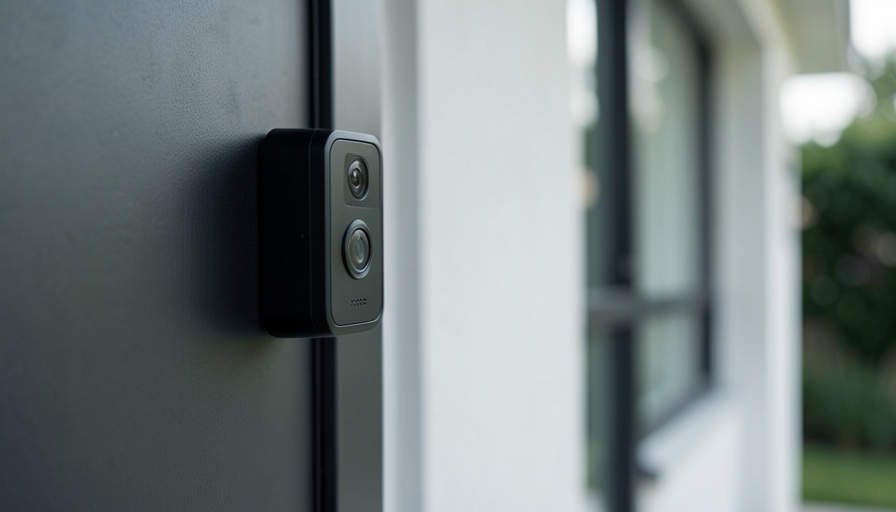
A doorbell camera watches your door around the clock and ships the footage to a company’s servers. These 15 questions matter as much as the video quality.
Most doorbell reviews obsess over resolution and night vision. Those are the easy parts. The harder question is what happens to the footage of everyone who walks up to your door, where it goes, how long it lives, and who else can watch it. That question stopped being hypothetical in 2023, when the FTC found that Ring had let employees and contractors browse customers’ private videos, including cameras inside bedrooms and bathrooms.
A new wave of privacy labels is supposed to make this easier to judge at the shelf. Before you trust a badge or a spec sheet, walk through these fifteen questions. They are grouped by what actually happens to your video: where it lives, who can see it, and what the device captures in the first place.
Short Answer
The privacy questions that matter most are where footage is stored, whether a subscription is required to keep it, whether audio is recorded, and who the company shares video with. Prioritize a doorbell that offers local storage, does not lock recordings behind a mandatory cloud plan, lets you disable audio and face detection, and carries the new U.S. Cyber Trust Mark. If a device fails those, better video quality will not make up for it.
Why the privacy label matters now
In 2025 the FCC launched the U.S. Cyber Trust Mark, a voluntary shield logo that appears on smart home devices meeting cybersecurity criteria set by NIST and verified by accredited labs. It sits alongside the app-store privacy labels from Apple and Google that list what data an app collects. None of these labels guarantees good behavior, but together they finally give a buyer something to check besides the marketing. The Ring case is the reason they exist: the company paid a $5.8 million settlement after failing to restrict who inside the company could watch customer footage.
Where your video is stored
Storage is the first fork in the road, and it is the one Reddit buyers argue about most, because it decides whether your footage sits on your shelf or on someone else’s server.
- Is footage stored locally or in the cloud? Local storage on a microSD card or a home hub keeps video in your house. Cloud storage is convenient but hands custody to the company. Many privacy-minded buyers choose local-first brands for exactly this reason.
- Is the video encrypted, ideally end to end? End-to-end encryption means even the company cannot watch your feed. Ask whether it is on by default or an option buried in settings, and whether enabling it disables features you wanted.
- How long is footage kept, and can you change it? Look for a clear retention window and a control to shorten it or auto-delete. Indefinite retention you cannot adjust is a quiet liability.
- Do you need a subscription just to keep recordings? Many doorbells show a live view free but paywall saved clips. Decide whether you are comfortable losing all history the day you stop paying, and price the subscription into the real cost.
Who can access your footage
A camera is only as private as the list of people allowed to open it, and that list is longer than most buyers assume.
- Who inside the company can view your video? Ask about access controls and whether the maker has had a breach or an employee-snooping incident. Ring’s history is the cautionary example of what weak internal limits allow.
- Does the company share footage with police, and is a warrant required? Policies shift, so check the current one. Ring ended its tool that let police request footage through the Neighbors app in January 2024, but law enforcement can still seek video through a warrant or a direct share.
- Is neighborhood or community sharing opt-in? Features that broadcast your clips to a neighborhood feed should be off until you choose them. Confirm you are not sharing by default.
- Who in your household can see the feed, and can you manage them? Shared-user access is convenient and easy to forget. You want a clear list of who has access and a way to revoke it, especially after a roommate or ex moves out.
- What does the app collect beyond video? Check the app-store privacy label for location, contacts, and usage data. A doorbell app that wants your location history is collecting more than it needs to ring a chime.
What the doorbell captures
The last group is about the recording itself, and one of these questions can actually put you on the wrong side of a law.
- Does it record audio, and is that legal where you live? Doorbell microphones often capture audio continuously, not just during calls. Around a dozen U.S. states require all parties to consent to an audio recording, so a device that records conversations on a public sidewalk can create a legal problem. Look for the ability to turn audio off.
- Does it use face recognition, and is it on by default? Familiar-face features are handy and sensitive. It should be opt-in, clearly labeled, and legal in your state, since places like Illinois regulate biometric data tightly.
- Can you set privacy or activity zones? Good doorbells let you exclude a neighbor’s yard, a shared hallway, or the public sidewalk from recording. This protects you legally and protects the people you did not mean to film.
- Can you disable the features you do not want? The test of a privacy-respecting device is how easily you can turn things off, not just on. If audio, cloud upload, or face detection cannot be disabled, that is your answer.
- Does it carry the Cyber Trust Mark or a clear privacy label? The mark is voluntary and new, so its absence is not a dealbreaker yet, but its presence is a real signal the maker met a baseline and agreed to be checked.
- What happens to your data if you stop paying or the company folds? Ask whether recordings are exportable and whether the device keeps working without the cloud. Smart-home brands get discontinued, and you do not want your door history trapped in a dead service.
What to prioritize
Fifteen questions is a lot to carry into a store, so weight them. If I had to rank, storage and control sit at the top: a doorbell with local storage, no mandatory subscription to keep clips, and switches to disable audio and face detection covers most of the risk on its own. The sharing questions come next, and the label is a tiebreaker between two otherwise similar models. Video quality, the thing the box brags about, is the easiest spec to satisfy and the least important to your privacy.
Audio recording and biometric laws vary by state and country, and this is general information rather than legal advice. If you plan to record audio or use face recognition, check your local rules or ask a qualified professional first.
Frequently Asked Questions
Are smart doorbells a privacy risk?
They can be, depending on the brand and your settings. The risks come from cloud storage, continuous audio, footage sharing, and weak internal access controls, all of which you can reduce by choosing carefully and turning off what you do not need.
Is local storage better than cloud for privacy?
Generally yes. Local storage keeps footage in your home and out of a company’s servers, which shrinks the number of people and systems that can reach it. The tradeoff is that you handle backups and remote access yourself.
Can police get my doorbell footage?
They can request it, and with a warrant they can often compel it. Some companies also offered voluntary sharing tools, though Ring ended its Neighbors police-request feature in early 2024. Check each brand’s current policy before you buy.
Is it legal for my doorbell to record audio?
It depends on your state. Around a dozen states require everyone in a conversation to consent to being recorded, so a doorbell capturing audio of people on the sidewalk can break the law. Disabling audio is the safe default.
What is the Cyber Trust Mark on smart devices?
It is a voluntary FCC label, launched in 2025, showing a device met cybersecurity standards and was tested by an accredited lab. It is a helpful signal, not a guarantee, and not every good product has one yet.
Do I have to pay a subscription to use a video doorbell?
Not always. Many offer a free live view, but saving and reviewing recorded clips often requires a plan. Some local-storage models let you keep footage with no subscription at all, which is worth seeking out.
What To Do Next
Before you buy, pull up the product’s app-store privacy label and its storage options, and answer the four that matter most: local or cloud, subscription or not, audio on or off, and who it shares with. A doorbell that gives you honest answers and real off switches is worth more than one with a sharper picture and a locked door to its own settings. For another connected-home buying question, see what a dishwasher warranty actually covers, and browse more in ShoutPost’s Home Improvement section.
Leave a Reply
You must be logged in to post a comment.